Car Auto Sync for Android
- 4.2
- Rating
- 500.00K
- Installs
- Free
- Price
 Analysis by App-foxy
When I tested Car Auto Sync, I approached it as a practical driving companion rather than a full replacement for every tool already on my phone. It sits in the Auto & Vehicles category and is made by One Music Player, with a focus on three everyday problems: keeping track of where I parked, watching my speed, and preparing an emergency email workflow. That combination is more useful than it first sounds, especially when a trip involves unfamiliar streets, a crowded car park, or a driver who wants a few safety-related shortcuts in one place.
The app is free to start, rated for Everyone, and available for Android devices running version 8.0 or later. It has reached over 500 thousand installs and holds a 4.2 average from around 1.3 thousand ratings. Those figures suggest that it has found a reasonably broad audience, but I would not mistake it for a deeply integrated vehicle system. My experience was closer to using a focused set of driving utilities gathered into one place. That distinction matters when deciding whether it deserves a permanent place on your phone.
From leaving home to finding the car again
The most convincing way to use Car Auto Sync is to treat a drive as a complete workflow. I begin with a simple starting condition: I am leaving home, heading somewhere I do not know well, and expect to park before walking the final part of the journey. Instead of relying on memory, I use the parking function as soon as I stop. The value is not that parking a car is difficult; it is that small errors become annoying later, particularly in large outdoor lots, multi-level garages, or unfamiliar neighborhoods.
You May Also Like

 Google Keep - Notes and lists
Google Keep’s Quiet Growth Shows the Appeal of Simpler Notes
As mobile work gets busier, Google Keep keeps winning a simple contest: capture a thought quickly, find it later, and get on with the day.

 Blood Strike: 2.5 Anniversary
Blood Strike’s Loadouts Turn Every Drop Into a Tactical Gamble
A close look at Blood Strike’s custom loadouts: how fast access to signature weapons reshapes its battle royale rhythm, rewards preparation, and narrows the gap between fights.

 Pandora - Music & Podcasts
Pandora’s Music Is Easy to Start, but Harder to Recover
Pandora’s strength is its low-effort path from a seed to a station. Its weak spot is how much confidence it asks you to place in connection, setup, and quiet recovery.

 8 Ball Pool
 Is Built on Rivalries, Rematches, and Routine
A close look at the rivalries, rematches, shared routines, and unanswered safety questions that turn a quick pool match into a persistent mobile community.

 Samsung Music
’s Quiet Strength Is Playing What You Already Own
Its reach comes less from spectacle than from dependable access to a personal library. That simplicity is both the app’s strongest retention engine and its ceiling.

 AccuWeather: Weather Radar
AccuWeather Review: A Quick, Clear Forecast for Everyday Decisions
For everyday plans, the best forecast is the one you can understand quickly. AccuWeather makes rain timing, radar, and local conditions easy to act on, with a few trade-offs.
More From Our News Desk



That first action should become a habit. I would not wait until I am already walking away and trying to reconstruct the location from memory. The better routine is to stop safely, open the app, save the parking position, and then put the phone away. This is one of the app's less obvious strengths: it encourages a deliberate handoff from driving mode to walking mode. The phone is no longer being used to guide the car, but it still holds the detail needed for the return trip.
For a realistic example, imagine arriving at a busy shopping center on a rainy afternoon. I park beside a row of similar vehicles, save the location, and leave without taking a photograph or trying to memorize a nearby sign. Later, instead of wandering between levels or guessing which entrance I used, I return to the saved parking point. That will not remove every challenge in a huge garage, because a map point may not identify the exact floor or bay, but it gives me a much better starting reference than an unreliable memory.
This is where I would add a personal backup habit: I still note a floor, section, or nearby landmark when one is available. Car Auto Sync can support the parking workflow, but it should not tempt you into ignoring useful context. A saved position and a quick mental note work better together than either one alone. In a tightly packed multi-level structure, that small extra step can save more time than repeatedly checking the phone.
Using the speed view without turning it into a distraction
Once the trip begins, the speed feature provides a second part of the workflow. I see it as a glanceable reference, not as an invitation to watch the screen continuously. The safest use is to check it before moving, during a brief stop, or when the phone is mounted in a position that can be viewed without taking attention away from the road. Any speed display becomes counterproductive if it encourages constant interaction.
This feature can be useful when the vehicle's own speed display is hard to read, when I am using a different driving position, or when I want a separate reference during a journey. It may also help a passenger monitor speed, leaving the driver free to concentrate on driving. That passenger-led use is an underrated option: the app becomes a shared travel tool rather than another screen competing for the driver's attention.
I would not use it as a substitute for responsible driving or assume that a phone-based reading is the authority in every situation. Vehicle displays and road signs remain more important for normal driving decisions. The practical trade-off is simple: Car Auto Sync can make speed information easier to consult, but the benefit depends heavily on mounting, visibility, and restraint. If your phone cannot be positioned safely, this part of the app is not worth forcing into your routine.
There is also a useful separation between the parking task and the speed task. I do not need to keep revisiting the parking screen while driving, and I do not need to treat the speed screen as a place to manage the end of the trip. Keeping those jobs distinct reduces clutter. Save the parking position at the beginning or end of the drive, use the speed view only when appropriate, and avoid turning one feature into a reason to interact with another.
Preparing the emergency email handoff
The emergency email function is the most sensitive part of the experience because it involves communication rather than simple personal convenience. I think of it as preparation for a handoff: the app helps me move from an incident or concern toward contacting someone who may need to know what happened. That makes setup more important than speed. A safety shortcut is only useful if the intended recipient, wording, and expectations are clear before an emergency occurs.
I would configure and review this workflow while stationary, not during a stressful moment on the roadside. The key question is not simply whether an email can be sent, but who should receive it and what information they would actually need. A trusted contact may be appropriate for a personal safety situation, while another type of incident may require official emergency services instead. Car Auto Sync should not be treated as a replacement for calling emergency responders when immediate help is required.
This is one of the app's important boundaries. An email can be delayed, overlooked, or unsuitable for urgent assistance. I would use the feature as an additional communication route, particularly for informing a trusted person, rather than as the only emergency plan. That distinction is easy to miss when a safety feature is presented alongside parking and speed tools, but it is essential in real use.
A practical preparation routine is to test the contact details without creating unnecessary alarm, explain to the recipient what the message means, and make sure the phone is ready before a journey. I would also avoid assuming that an emergency email automatically contains every detail someone might need. The safer mindset is to see it as a prompt or message channel within a wider plan, not a complete roadside response system.
Where the handoffs feel smooth
The app works best when the handoffs are simple: driving ends, parking is recorded, walking begins, and the saved location becomes useful later. The same applies to speed monitoring: the phone is positioned before movement, a passenger or a quick glance handles the check, and the driver keeps attention on the road. These are small workflows, but they make the app feel more purposeful than a collection of unrelated buttons.
I also appreciate that the three main uses address different moments of a trip. Parking helps after arrival, speed support applies during travel, and emergency email preparation matters when communication becomes necessary. That spread gives the app a wider role than a parking marker alone. At the same time, it means the experience is not equally valuable to everyone. Someone who only wants to remember a parking spot may find the rest of the interface unnecessary, while a driver looking for complete navigation, vehicle diagnostics, or entertainment controls will need other tools.
The handoff from the app to the rest of the phone is another point to consider. Car Auto Sync does not eliminate the need for maps, phone calls, messaging, or the vehicle's own controls. Instead, it works beside them. I would save the parking location here, use a familiar navigation tool for the walk back if needed, and rely on normal calling or official emergency channels when the situation demands urgent assistance. The app is most sensible as a coordinator for a few tasks, not as the entire driving environment.
What the completed trip looks like
A successful outcome is modest but tangible. I arrive, record the car's location, complete my visit, and find the vehicle without wasting time searching. During the journey, the speed view is available when I need a quick reference, provided the phone is positioned safely. If a safety-related communication is necessary, the emergency email workflow gives me another prepared route to a trusted contact. None of these results is dramatic, but together they reduce small points of friction that can make driving more stressful.
The parking function is likely to deliver the clearest everyday benefit. It is easy to imagine using it at an airport-style lot, a festival, a hospital campus, or a city street where every nearby vehicle looks alike. The app is also useful for people who frequently lend their car to a family member and want a simple shared habit: whoever parks records the location, and whoever returns can use that information.
The speed feature has a narrower but still legitimate role. It may be helpful in an older vehicle, for a passenger who wants a visible reference, or for someone who prefers a separate display. However, I would not choose this app solely for speed tracking if the car already provides a clear, reliable speedometer. In that situation, the phone adds another device to position and monitor without solving a real problem.
The emergency email option produces the most conditional result. It can improve preparedness when a trusted recipient understands the arrangement, but it does not turn a phone into a guaranteed emergency communications system. Network availability, attention, and the seriousness of the event all affect its usefulness. My recommendation is to regard it as one layer in a safety plan, alongside normal emergency numbers and direct communication with people who can act.
Where the workflow breaks down
The first point of friction is the gap between a saved parking position and the exact place where the car is located. In an open lot, the location can be enough. In a multi-level garage, it may not tell me the floor, row, or entrance with the precision I want. That is why I would always add a landmark or take a quick mental note. The app improves recall, but it cannot replace every detail of the environment.
The second issue is phone dependence. A speed tool requires a safe viewing setup, and any parking or communication action requires the phone to be available at the right moment. If the battery is low, the device is poorly mounted, or I am in a place with weak connectivity, the workflow becomes less dependable. These are not reasons to dismiss the app, but they are reasons to keep a backup habit rather than assuming one tap solves everything.
The emergency email workflow also has a built-in limitation: email is not the fastest or most appropriate channel for every incident. I would skip relying on it for an immediate threat, a medical emergency, or any situation where professional responders are needed. In those cases, the app can be secondary at most. This is a clear example of where another option is better: direct emergency calling should take priority over a prepared email.
There may also be friction for users who expect automatic vehicle integration. The short description calls it “Car Auto Sync,” but my practical evaluation is that the useful experience comes from managing driving-related tasks on the phone, not from assuming that every car system will be controlled or synchronized in the same way. If your priority is built-in dashboard integration, advanced vehicle data, or a comprehensive navigation platform, you should look for a dedicated solution designed around that requirement.
The current version is 3.1.0, and the app has been available since July 31, 2024. That places it in the category of a relatively recent utility rather than a long-established automotive platform. I would keep expectations realistic: the appeal is its focused workflow, not a huge ecosystem of mature vehicle functions. The version information is useful when checking compatibility or deciding whether an older Android phone is suitable.
Who should use it, and who should pass
I would recommend Car Auto Sync to someone who regularly forgets where they parked, wants a simple speed reference, and values having a prepared way to notify a trusted person. It is especially appealing if you prefer one small utility for several related driving tasks instead of installing separate parking, speed, and safety apps. The free entry point makes it easy to try without committing to a purchase, although in-app items range from under a dollar to nearly a hundred dollars each, so I would review any purchase screen carefully before confirming anything.
It is also a reasonable choice for drivers who use Android devices that are not especially new, since the minimum requirement is Android 8.0. The Everyone age rating makes it broadly accessible, though younger users should still follow local rules and adult guidance around phone use in cars. The app should be set up before driving, and no feature justifies handling a phone while the vehicle is moving.
I would skip it if your main need is turn-by-turn navigation, detailed vehicle diagnostics, music management, or deep integration with a factory infotainment system. A dedicated navigation app is better for route planning, the car's own instruments are better for core driving information, and an official emergency service is better for urgent assistance. I would also skip it if you already have a reliable parking routine and do not want another app involved in a task you can handle with a photograph or a map pin.
Compared with the usual alternatives, its advantage is concentration. A basic map pin may handle parking, a dashboard may handle speed, and the phone's normal communication tools may handle email, but Car Auto Sync brings these driving-related actions into one focused place. The trade-off is depth. Separate specialist tools may offer more advanced navigation, richer location notes, stronger communication options, or better vehicle integration. I see this app as the middle ground: more organized than improvised phone habits, but less comprehensive than a full automotive platform.
My recommendation after following the full workflow
After using it from departure through parking, walking, and communication preparation, I see Car Auto Sync as a useful convenience app with a sensible safety angle, provided its boundaries are respected. Its best moment is the ordinary one: I park somewhere confusing, record the location, and later return without wasting time. The speed display can complement that routine, while the emergency email feature adds preparedness when it is configured thoughtfully.
My advice is to set it up at home, decide exactly when you will save a parking position, and create a backup habit for garages or large lots. Position the phone before moving, avoid interacting with it while driving, and explain the emergency email workflow to the person who may receive it. Those steps turn the app from a promising collection of functions into a repeatable routine.
Car Auto Sync is worth trying if you want a compact Android tool for parking memory, speed awareness, and prepared contact workflows, but it works best as a supporting layer rather than your only driving or emergency solution. Its 4.2 average and growing install base make it easy to understand why people are interested, yet the real decision comes down to your habits. If its three tasks match genuine problems in your day, the free starting point makes experimentation reasonable. If you need full navigation, vehicle integration, or guaranteed emergency response, another option will serve you better.
FAQs for Car Auto Sync for Android
01What is Car Auto Sync, and how does it work?
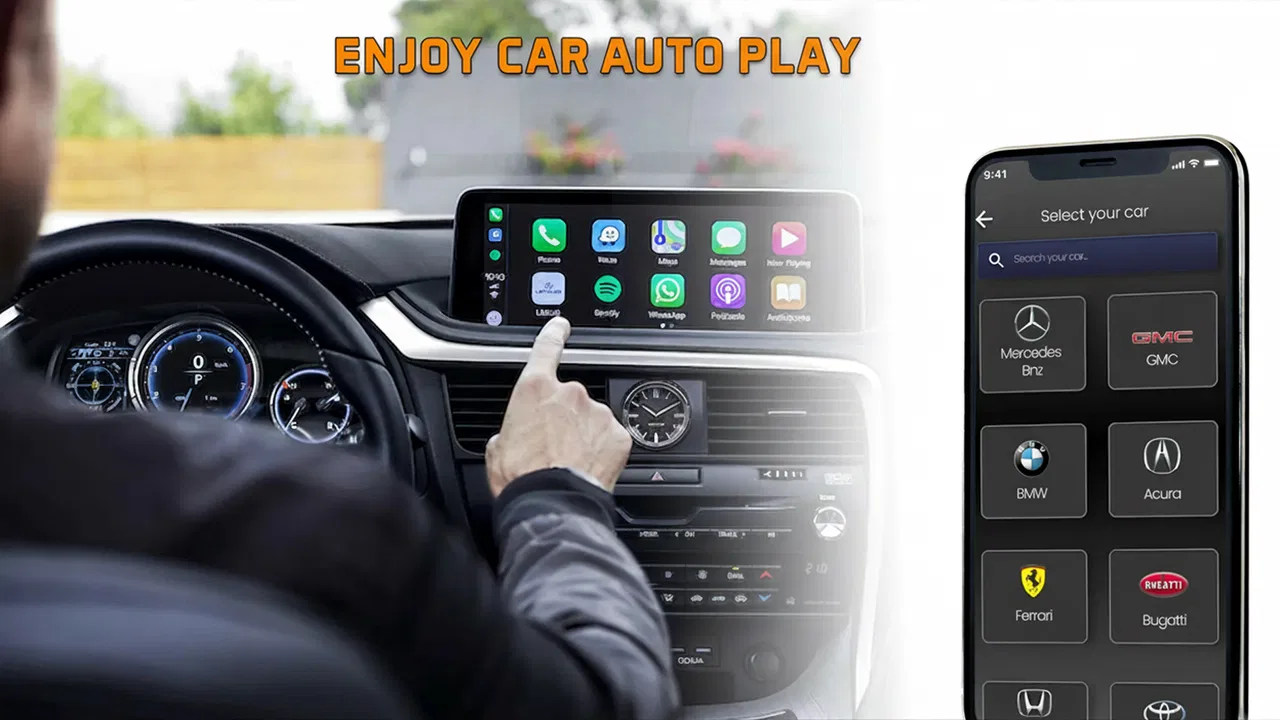
Car Auto Sync is an app designed to seamlessly connect your mobile device with your car's infotainment system. It allows you to sync contacts, music, navigation data, and more, providing a unified experience. The app uses Bluetooth or Wi-Fi to establish a connection, ensuring your phone's content is accessible through your car's interface.
02Is Car Auto Sync compatible with all car models and mobile devices?
Car Auto Sync is compatible with most modern cars and smartphones, but it's essential to check the specific compatibility list provided by the developers. Some older car models may not support the necessary technology, and certain phone models might require additional settings or permissions to work efficiently with the app.
03Does Car Auto Sync require an internet connection for all features?
While some features of Car Auto Sync, like real-time navigation and streaming services, require an internet connection, basic functions such as contact syncing and music playback from local storage do not. It's advisable to have a stable internet connection to enjoy all functionalities seamlessly.
04How secure is Car Auto Sync in terms of privacy and data protection?
Car Auto Sync prioritizes user privacy and employs encryption protocols to protect your data during transmission. The app does not store personal data beyond what is necessary for functionality. Users are encouraged to review the app’s privacy policy to understand how their data is handled and protected.
05Can I customize the features of Car Auto Sync to suit my needs?
Yes, Car Auto Sync offers various customization options to enhance user experience. You can adjust settings for notifications, choose which apps can sync, and set preferences for how content is displayed on your car’s interface. The app is designed to be flexible, accommodating different user preferences and needs.
Pros
- Seamlessly integrates with various car models.
- User-friendly interface with clear instructions.
- Automatic updates keep features current.
- Supports multiple languages for global users.
- Minimal battery usage while running.
Cons
- Limited compatibility with older car models.
- Occasional sync delays reported by users.
- Premium features require subscription.
- Initial setup can be confusing for new users.
- Lacks detailed offline documentation.

Car Auto Sync for Android
Gallery